






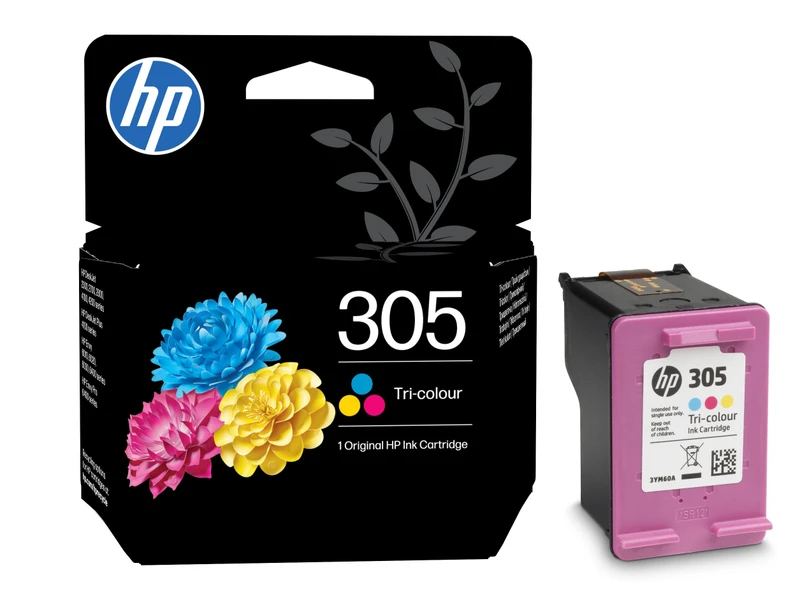
HP 305 Tri-color Original Ink Cartridge for Everyday Colour Printing
The HP 305 Tri-color Original Ink Cartridge is a genuine HP cartridge containing cyan, magenta and yellow dye-based inks in one convenient unit. Identified by part number 3YM60AE, it produces clear graphics, bright school projects, colourful documents and natural-looking everyday photos.
With a 2ml ink volume and an estimated yield of approximately 100 colour pages, this standard-capacity cartridge is a practical choice for homes, students and small offices with light or occasional printing requirements. Actual page yield varies depending on page content, printer settings, print frequency and other conditions.
Why Choose the HP 305 Tri-color Original Ink Cartridge?
The HP 305 Tri-color Original Ink Cartridge is engineered to work with compatible HP Thermal Inkjet printers. Because the ink and printhead system are designed together, the cartridge delivers consistent colour placement, dependable operation and straightforward installation.
- Genuine HP cartridge for compatible HP printers
- Cyan, magenta and yellow inks in one cartridge
- Dye-based formulation for bright colour output
- Suitable for documents, charts, graphics and photographs
- Standard-capacity design for everyday home and office printing
- Easy installation without separate colour cartridges
Bright Colour for Documents and Photos
The dye-based ink inside this original HP 305 colour cartridge produces smooth colour transitions and vibrant graphics. It is suitable for printing school assignments, presentations, charts, recipes, invitations and occasional photographs.
The cartridge combines all three printing colours in a single unit. This makes replacement simple because you do not need to install separate cyan, magenta and yellow cartridges.
HP 305 Tri-color Original Ink Cartridge Specifications
| Product name | HP 305 Tri-color Original Ink Cartridge |
|---|---|
| Manufacturer part number | 3YM60AE |
| Brand | HP |
| Product type | Original ink cartridge |
| Capacity | Standard capacity |
| Cartridge colours | Cyan, magenta and yellow |
| Ink type | Dye-based |
| Ink volume | 2ml |
| Estimated page yield | Approximately 100 colour pages |
| Print technology | HP Thermal Inkjet |
| Ink drop | 6.3pl and 2.8pl |
| Printhead nozzles | 588 |
| Package contents | One HP 305 tri-colour ink cartridge |
Page-yield notice: The approximately 100-page rating is based on HP testing methodology and ISO/IEC 24711 standards. Actual results can vary considerably according to the documents printed, colour coverage, printer settings and frequency of use.
HP 305 Ink Cartridge Compatible Printers
The HP 305 Tri-color Original Ink Cartridge is listed by HP for the following printer families and models:
- HP DeskJet 2300 series
- HP DeskJet 2700 series
- HP DeskJet 2730 series
- HP DeskJet 2810e series
- HP DeskJet 2820e series
- HP DeskJet 2825e series
- HP DeskJet 2827e series
- HP DeskJet 2842e series
- HP DeskJet Plus 4100 series
- HP DeskJet 4134 series
- HP DeskJet 4220 series
- HP DeskJet 4227e series
Important compatibility advice: Ink cartridge numbers may vary between printer regions. Before ordering, check that HP 305 or 3YM60AE appears on your existing cartridge, printer manual or supplies label.
Who Is This HP 305 Colour Cartridge Suitable For?
- Families printing occasional colour documents and photographs
- Students producing assignments, charts and school projects
- Home offices printing presentations and business graphics
- Users who prefer genuine HP ink and predictable compatibility
- Light-volume users who do not require a high-yield XL cartridge
How to Install the HP 305 Tri-colour Cartridge
- Switch on the printer and open its cartridge access door.
- Wait for the cartridge carriage to stop moving.
- Remove the empty tri-colour cartridge carefully.
- Unpack the new HP 305 cartridge and remove its protective tape.
- Avoid touching the copper contacts or ink nozzles.
- Insert the cartridge into the correct colour slot until it clicks.
- Close the access door and complete cartridge alignment if requested.
HP 305 Original Ink Cartridge in Nairobi
Customers searching for an HP 305 Tri-color Original Ink Cartridge in Kenya can order from Shah Computers or visit us on the 1st Floor, Maharaja House, 01 Shivachi Road, opposite M.P. Shah Hospital in Westlands, Nairobi. Call 0113 219 859 to confirm current price and availability.
Explore additional HP ink and toner cartridges from Shah Computers.
For manufacturer information, page-yield details and current compatibility guidance, refer to the official HP 305 Tri-color Original Ink Cartridge page.
Frequently Asked Questions
What is the HP 305 Tri-color Original Ink Cartridge?
The HP 305 Tri-color Original Ink Cartridge is a genuine standard-capacity HP cartridge containing cyan, magenta and yellow dye-based inks. Its manufacturer part number is 3YM60AE.
How many pages does the HP 305 tri-colour cartridge print?
HP rates the cartridge for approximately 100 colour pages. The actual yield depends on colour coverage, printer settings, document type and printing frequency.
How much ink is in the HP 305 colour cartridge?
The cartridge contains 2ml of dye-based tri-colour ink.
Which colours are included in the cartridge?
It contains cyan, magenta and yellow. The three inks work together to produce colours, photographs and graphics.
Does the HP 305 cartridge contain black ink?
No. This is the tri-colour cartridge only. Compatible printers normally use a separate HP 305 Black Original Ink Cartridge for black text and monochrome printing.
Is HP 305 the same as HP 305XL?
No. Both versions may fit compatible printers, but HP 305 is the standard-capacity cartridge. HP 305XL is a separate high-yield option designed to print more pages.
Can I use this cartridge for photographs?
Yes. Its dye-based cyan, magenta and yellow inks are suitable for everyday colour photographs, graphics, invitations and school projects when used with appropriate paper and printer settings.
How do I confirm compatibility before ordering?
Check the cartridge number shown inside your printer, on the existing cartridge or in the printer manual. It should specify HP 305 or part number 3YM60AE because cartridge compatibility can differ by region.
Where can I get the HP 305 colour cartridge in Nairobi?
The cartridge is available from Shah Computers in Westlands, Nairobi. Call 0113 219 859 to confirm stock before visiting.
Reviews
There are no reviews yet.