



Epson 101 Black Ink Bottle 127ml
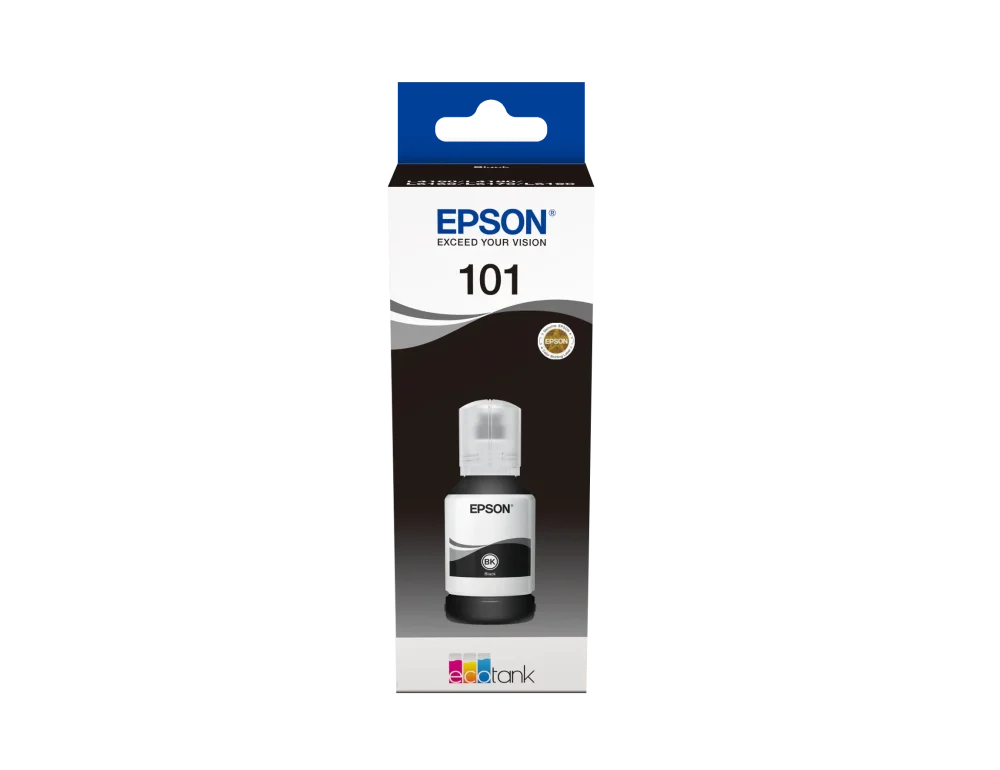
The Epson 101 Black Ink Bottle is a 127ml original pigment-based refill made for compatible Epson EcoTank printers. It produces crisp, well-defined black text and is suitable for printing reports, invoices, forms, assignments, business correspondence and other text-heavy documents.
With an estimated replacement yield of up to 7,500 black pages, this high-capacity EcoTank ink bottle is ideal for homes, schools, offices and businesses with regular or high-volume document-printing requirements.
Why Choose the Epson 101 Black Ink Bottle?
The Epson 101 Black Ink Bottle is developed to work with supported Epson EcoTank printers and their refillable ink-delivery systems. Its pigment formulation helps create clear document text while supporting dependable everyday printing.
Original Epson ink is tested for the manufacturer’s supported printers, making it a suitable choice for users who value consistent print quality, straightforward refilling and predictable printer operation.
Pigment Black Ink for Clear Documents
The Epson 101 black refill contains pigment-based ink. Pigment ink is primarily designed for sharp text, making it particularly useful for office paperwork and documents that need to remain easy to read.
It is suitable for printing:
- Invoices, quotations and receipts
- Business letters and reports
- School assignments and learning materials
- Application forms and official documents
- Presentation notes and handouts
- General home and office paperwork
High-Capacity 127ml EcoTank Refill
The Epson 101 Black Ink Bottle contains 127ml of black ink and can deliver up to approximately 7,500 pages under Epson’s specified testing conditions.
Actual page yield varies according to page coverage, font size, print-quality settings, cleaning cycles, paper type, printer condition and operating environment. The initial ink fill can also produce a lower usable yield because some ink is required to charge the printer’s printhead system.
The refillable EcoTank format reduces the need to replace conventional ink cartridges frequently, helping users manage larger document-printing workloads.
Keyed and No-Squeeze Bottle Design
The bottle is designed for clean and accurate refilling. Its keyed nozzle matches the appropriate black ink-tank inlet, helping prevent the bottle from being placed into the wrong colour tank.
The no-squeeze design allows ink to flow when the bottle is correctly positioned. This makes topping up the printer more convenient and helps reduce unnecessary spills and ink waste.
Epson 101 Black Ink Compatible Printers
The Epson 101 Black Ink Bottle is compatible with the following Epson EcoTank printers:
- Epson EcoTank L4150
- Epson EcoTank L4160
- Epson EcoTank L4260
- Epson EcoTank L6160
- Epson EcoTank L6170
- Epson EcoTank L6176
- Epson EcoTank L6190
- Epson EcoTank L6290
- Epson EcoTank L14150
Compatibility notice: Check your printer’s complete model number and confirm that it specifies Epson 101 black ink before ordering. Other EcoTank printers may require Epson 103, 104, 112, 664 or another ink-bottle series.
Epson 101 Black Ink Specifications
| Brand | Epson |
|---|---|
| Ink series | Epson 101 |
| SKU | C13T03V14A |
| Product type | Original EcoTank ink refill bottle |
| Printing colour | Black |
| Ink formulation | Pigment-based |
| Ink capacity | 127ml |
| Estimated page yield | Up to 7,500 black pages |
| Refill design | Keyed, no-squeeze, mess-reducing bottle |
| Compatible printer family | Selected Epson EcoTank printers |
| Quantity | One black ink bottle |
How to Refill an Epson EcoTank Printer
- Confirm that your printer uses Epson 101 black ink.
- Place the printer on a stable and level surface.
- Open the printer’s ink-tank cover.
- Locate and open the black ink-tank cap.
- Remove the Epson 101 bottle cap without squeezing the bottle.
- Match the keyed nozzle with the black tank inlet.
- Insert the bottle vertically and allow the ink to flow.
- Remove the bottle and close the black tank securely when finished.
Do not place black ink into the cyan, magenta or yellow tank. Always follow the setup, refilling and safety instructions supplied with your Epson printer and printed on the ink packaging.
Who Is the Epson 101 Black Ink Suitable For?
- Businesses printing invoices, quotations and reports
- Schools producing assignments and learning materials
- Home offices with frequent document-printing needs
- Students printing notes and coursework
- Organisations producing forms and correspondence
- Users with a compatible Epson EcoTank printer
What Is Included?
- One original Epson 101 black ink bottle
- 127ml of pigment-based black ink
- Factory-fitted keyed refill nozzle
Epson 101 Black Ink in Nairobi
Customers looking for original Epson printer ink in Kenya can order the Epson 101 Black Ink Bottle from Shah Computers, located on the 1st Floor of Maharaja House, 01 Shivachi Road, opposite M.P. Shah Hospital in Westlands, Nairobi. Call 0113 219 859 to confirm availability.
Browse our complete range of printer ink bottles and other ink and toner cartridges for home, school and business printing.
For manufacturer information, specifications and support, visit the official Epson 101 Black Ink Bottle page.
Frequently Asked Questions
What is the Epson 101 Black Ink Bottle?
The Epson 101 is a 127ml original pigment black ink refill for selected Epson EcoTank printers.
Which printers use Epson 101 black ink?
Compatible models include the Epson L4150, L4160, L4260, L6160, L6170, L6176, L6190, L6290 and L14150.
Is C13T03V14A original Epson ink?
Yes. C13T03V14A is the official SKU for the original Epson 101 127ml black EcoTank ink bottle.
How much ink is inside the Epson 101 black bottle?
Each Epson 101 Black Ink Bottle contains 127ml of pigment-based black ink.
Is Epson 101 black ink pigment-based?
Yes. The black ink is pigment-based and is designed to produce crisp, clear text on compatible EcoTank printers.
How many pages does Epson 101 black ink print?
The replacement bottle can print up to approximately 7,500 black pages under Epson’s testing conditions. Actual yield varies according to content, settings and printer usage.
Why can the initial ink yield be lower?
During initial printer setup, some ink is used to fill the printhead and ink-delivery system. This means the first set of bottles may produce fewer printable pages than replacement bottles.
Is the Epson 101 bottle completely spill-proof?
It has a keyed, no-squeeze design intended to reduce spills and incorrect filling, but the bottle should still be handled carefully and kept upright.
Can I use Epson 101 ink in any EcoTank printer?
No. Only use it when the printer manual, tank label or official Epson compatibility information specifies Epson 101 ink.
What is the difference between Epson 101 and other Epson inks?
Epson ink series are designed for specific printer families. Epson 101 should not be substituted with Epson 103, 104, 112 or 664 unless the printer documentation specifically permits it.
Where can I find Epson 101 black ink in Nairobi?
Contact Shah Computers on 0113 219 859 or visit our Westlands store on the 1st Floor of Maharaja House, 01 Shivachi Road, opposite M.P. Shah Hospital.
Reviews
There are no reviews yet.