





Logitech MK540 Advanced – Familiar Comfort with Reliable Wireless Performance
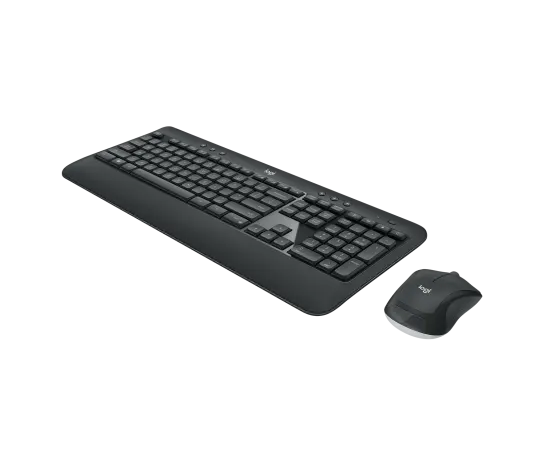
The Logitech MK540 Advanced is a full-size wireless keyboard and mouse combo designed for users who want comfortable typing, precise navigation and dependable everyday performance.
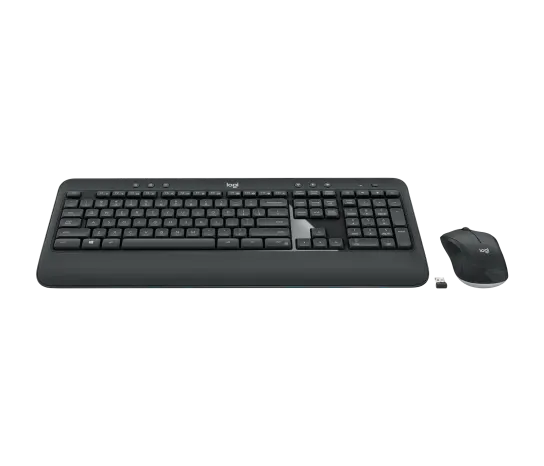
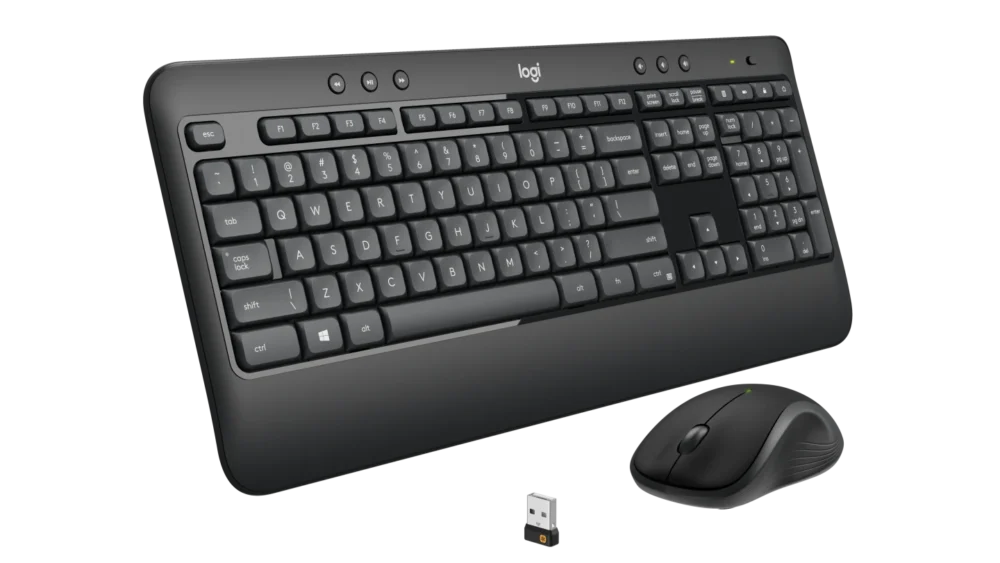
The combination includes the Logitech K540 wireless keyboard, the Logitech M310 wireless mouse and a Logitech Unifying USB receiver. Together, they provide a familiar and comfortable setup for office work, business applications, school, home computing and everyday productivity.
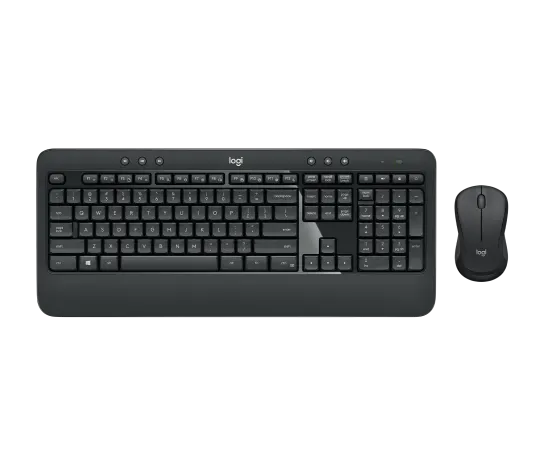
The keyboard features familiar deep-profile keys, quiet typing, a built-in palm rest, adjustable tilt positions, multimedia controls and a dedicated number pad. The included wireless mouse has a comfortable contoured shape with smooth optical tracking and simple line-by-line scrolling.
For users looking for a dependable wireless keyboard and mouse combo, the Logitech MK540 Advanced offers a balanced combination of comfort, productivity and long battery life.
Full-Size Keyboard with a Familiar Layout
The Logitech MK540 keyboard uses a familiar full-size layout designed to help users begin working comfortably without having to adjust to an unusual keyboard arrangement.
The keyboard includes:
- Standard full-size key layout
- Deep-profile keys
- Dedicated number pad
- Function keys
- Media controls
- Programmable keys
- Caps Lock indicator light
- Battery indicator light
- On/Off power switch
This layout makes the Logitech MK540 keyboard and mouse combination suitable for office users who regularly work with documents, emails, spreadsheets, accounting systems and business software.
The familiar key shape and spacing are particularly useful in professional environments where users type for extended periods throughout the working day.
Quiet and Comfortable Typing
The Logitech MK540 Advanced keyboard is designed for a comfortable and quieter typing experience.
Its familiar key shape and deep-profile key design provide clear tactile feedback, while reduced typing noise makes the keyboard suitable for shared working environments.
It is a practical choice for:
- Open-plan offices
- Reception desks
- Shared workspaces
- Home offices
- Administrative departments
- School computer rooms
- Libraries and study areas
For users who want a full-size keyboard without excessive typing noise, the MK540 provides a practical balance between familiar key travel and quieter operation.
Integrated Palm Rest for Better Everyday Comfort
The keyboard includes a built-in palm rest that provides additional hand support while typing.
This is particularly useful for people who spend long periods working with:
- Microsoft Office applications
- Accounting software
- Data entry
- Inventory systems
- Customer management software
- Reports and documents
The palm rest is built directly into the keyboard, creating a complete workstation design without requiring a separate wrist-rest accessory.
Three Adjustable Keyboard Positions
Different users prefer different keyboard angles.
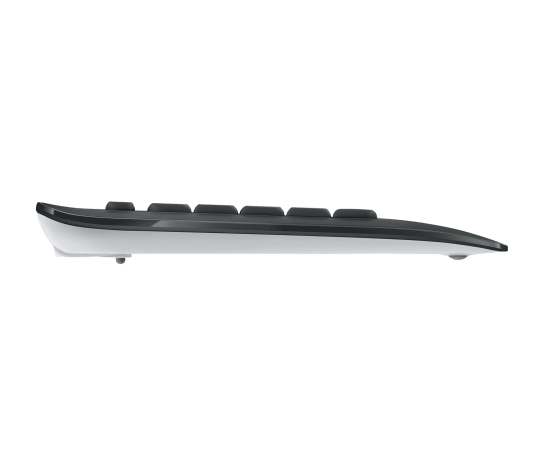
The Logitech MK540 Advanced offers three keyboard positioning options:
- Natural flat position
- 4° tilt
- 8° tilt
The adjustable tilt legs allow users to select a keyboard angle that feels comfortable for their individual desk setup and typing preference.
This flexibility makes the combo suitable for shared workstations where different employees may use the same computer at different times.
Dedicated Media and Music Controls
The Logitech MK540 includes convenient multimedia controls for easier access to common functions.
Depending on the connected system and application support, the keyboard can provide quick access to common media actions such as:
- Volume adjustment
- Media playback controls
- Music functions
- Frequently used shortcuts
This allows users to control common functions without repeatedly navigating through on-screen menus.
For office and home users who frequently attend calls, watch training videos or listen to audio while working, dedicated controls can make everyday computer use more convenient.
Programmable Keys with Logi Options+
Supported keyboard controls can be customized using the optional Logi Options+ App on compatible systems.
Customization can help users create shortcuts for frequently used actions and improve workflow efficiency.
Internet access is required to download the optional Logi Options+ software.
The keyboard and mouse can still perform their basic functions without the optional customization software.
Full 10-Key Number Pad
The Logitech MK540 keyboard includes a dedicated 10-key numeric keypad.
This is particularly useful for:
- Accountants
- Cashiers
- Administrators
- Data-entry professionals
- Finance departments
- Inventory teams
- Business owners
- Spreadsheet users
For users who enter numbers frequently, a dedicated number pad is generally more convenient than using the number row above the main letter keys.
This makes the Logitech wireless combo a practical option for professional business environments.
Spill-Resistant Keyboard Design
The keyboard features a spill-resistant design intended to provide additional protection against minor accidental liquid spills during normal desk use.
This makes it especially practical for:
- Busy offices
- Shared desks
- Schools
- Reception counters
- Home workspaces
The spill-resistant design should not be treated as waterproof protection, and liquids should still be cleaned promptly according to appropriate care instructions.
Durable Key Printing
The keyboard uses abrasion-resistant key printing designed for regular everyday use.
This is useful for business environments where keyboards may be used for many hours each day.
The combination of familiar key design, quiet operation and durable key markings makes the MK540 suitable for regular office productivity.
Comfortable Logitech M310 Wireless Mouse
The Logitech MK540 Advanced package includes the Logitech M310 wireless mouse.
The mouse has a comfortable contoured shape designed for convenient everyday navigation.
Its design is suitable for both left-handed and right-handed use, making the combo practical for shared computer workstations.
Mouse Features
- Smooth Optical Tracking
- 3 buttons
- Left click
- Right click
- Middle click
- Line-by-line scrolling
- 2D optical scroll wheel
- On/Off power button
The mouse is suitable for routine activities including web browsing, office applications, email, document editing and general computer navigation.
Smooth Optical Tracking
The included mouse uses Smooth Optical Tracking for reliable everyday cursor control.
It is suitable for common productivity tasks such as:
- Navigating spreadsheets
- Browsing websites
- Editing documents
- Managing email
- Using business software
- Working with online applications
For everyday office and home computing, the M310 provides a straightforward and comfortable navigation experience.
Reliable Wireless Connection Up to 10 Metres
The Logitech MK540 Advanced wireless combo offers a wireless operating range of up to approximately 10 metres or 33 feet.
Actual operating range can vary depending on environmental conditions, nearby wireless devices and the computer setup.
The wireless connection helps reduce desk cable clutter and allows more flexibility when positioning the keyboard and mouse.
This makes the combo suitable for:
- Office desktops
- Home workstations
- Meeting-room computers
- Reception desks
- Training rooms
- School computer labs
Logitech Unifying USB Receiver
The MK540 Advanced package includes a Logitech Unifying receiver.
The receiver connects to an available compatible USB port and provides wireless connectivity for the keyboard and mouse.
The combination is supplied ready for convenient wireless use without requiring separate wired connections for each device.
This keeps the desk setup cleaner while giving users the convenience of wireless input devices.
Long Keyboard Battery Life
The Logitech K540 keyboard is powered by two AA alkaline batteries.
Maximum battery life is rated at up to 36 months, depending on user behaviour and computing conditions.
Keyboard Power Features
- 2 × AA batteries
- Batteries included and pre-installed
- Up to 36 months battery life
- Physical On/Off power switch
- Battery indicator light
Long battery life can help reduce maintenance requirements in offices, schools and organisations managing multiple workstations.
Long Mouse Battery Life
The Logitech M310 mouse uses one AA alkaline battery.
Its maximum battery life is rated at up to 18 months, depending on individual use and computing conditions.
Mouse Power Features
- 1 × AA battery
- Battery included and pre-installed
- Up to 18 months battery life
- Physical On/Off power switch
Together, the long battery life of the keyboard and mouse makes the MK540 suitable for regular workplace use.
Keyboard Dimensions
Logitech K540 Keyboard
- Height: 193.5 mm
- Width: 457.3 mm
- Depth: 24 mm
- Weight without batteries: 633 g
The keyboard provides a full-size working layout with a number pad, media controls and palm rest.
Mouse Dimensions
Logitech M310 Mouse
- Height: 111.5 mm
- Width: 61.8 mm
- Depth: 39.2 mm
- Weight: 73.5 g
The mouse is compact enough for everyday desk use while offering a comfortable contoured shape.
Ideal for Business and Office Use
The Logitech MK540 keyboard and mouse combo is well suited to professional working environments.
It is ideal for:
- Corporate offices
- Small businesses
- Accounting departments
- Administrative teams
- Reception areas
- Sales departments
- Customer service desks
- Home offices
- School computer rooms
Its familiar layout helps users begin working quickly, while the palm rest and adjustable keyboard angle support a more comfortable workstation setup.
Excellent for Accounting and Data Entry
The dedicated number pad makes the MK540 particularly useful for users working with numerical information.
It can be used for:
- Microsoft Excel
- Accounting software
- Inventory management
- POS administration
- Financial calculations
- Sales reports
- Data entry
The full-size keyboard layout provides easier access to both standard typing keys and numeric data-entry controls.
Suitable for Home and Remote Work
The Logitech MK540 Advanced is also a practical choice for people building a comfortable home workstation.
The wireless setup reduces unnecessary keyboard and mouse cables, while the familiar layout supports everyday productivity.
The combo can be used for:
- Remote work
- Online meetings
- Research
- Web browsing
- Business applications
- Office documents
- General home computing
System Compatibility
The Logitech MK540 Advanced requires an available compatible USB port for the included receiver.
Supported Operating Systems
- Windows 7
- Windows 10
- Windows 11 or later
- ChromeOS
Internet access is required to download the optional Logi Options+ customization application.
Before purchasing for a device without a standard compatible USB port, check whether a suitable adapter or docking solution is required.
Why Choose the Logitech MK540 Advanced?
The Logitech MK540 Advanced is designed for users who need a familiar full-size keyboard and comfortable mouse for regular everyday work.
Key benefits include:
- Full-size wireless keyboard and mouse combination
- Familiar deep-profile keyboard keys
- Quiet typing experience
- Integrated palm rest
- Three keyboard tilt positions
- Dedicated multimedia controls
- Programmable keys
- Full numeric keypad
- Spill-resistant keyboard design
- Abrasion-resistant key printing
- Comfortable M310 wireless mouse
- Smooth optical tracking
- Reliable wireless range up to 10 metres
- Logitech Unifying receiver included
- Up to 36 months keyboard battery life
- Up to 18 months mouse battery life
The Logitech MK540 is a strong choice for offices, businesses, schools and home users who want comfort, reliability and convenient wireless operation in one complete package.
Technical Specifications
Product Name: Logitech MK540 Advanced
Product Type: Wireless Keyboard and Mouse Combo
Wireless Range: Up to approximately 10 metres
Receiver: Logitech Unifying USB Receiver
USB Port Required: Yes
Optional Customization Software: Logi Options+
Keyboard Specifications
Keyboard Model: Logitech K540
Key Type: Deep profile
Keyboard Layout: Full size
Number Pad: Yes, 10-key numeric keypad
Palm Rest: Yes
Spill-Resistant Design: Yes
Adjustable Tilt: Natural, 4° and 8°
Special Keys: Music controls and programmable keys
Caps Lock Indicator: Yes
Battery Indicator: Yes
Power Switch: On/Off
Battery Type: 2 × AA alkaline batteries
Maximum Battery Life: Up to 36 months
Mouse Specifications
Mouse Model: Logitech M310
Sensor Technology: Smooth Optical Tracking
Number of Buttons: 3
Scrolling Type: Line-by-line
Scroll Wheel: 2D optical
Middle Click: Yes
Power Button: On/Off
Battery Type: 1 × AA alkaline battery
Maximum Battery Life: Up to 18 months
Operating System Compatibility
- Windows 7
- Windows 10
- Windows 11 or later
- ChromeOS
Warranty: 1-year limited hardware warranty
What’s in the Box?
The Logitech MK540 Advanced package includes:
- Logitech K540 Wireless Keyboard
- Logitech M310 Wireless Mouse
- Logitech Unifying USB receiver
- 3 × AA alkaline batteries, pre-installed
- User documentation
Buy Logitech MK540 Advanced in Kenya
The Logitech MK540 Advanced is a practical choice for customers looking for a reliable full-size wireless keyboard and mouse combo for office work, business applications, accounting, administration, school or home use.
Its combination of familiar typing, a built-in palm rest, multimedia controls, a dedicated number pad, a comfortable wireless mouse and long battery life makes it suitable for demanding everyday productivity.
Shah Computers supplies genuine Logitech accessories for individual customers, offices, schools and businesses.
Browse more Logitech products in Kenya to explore Logitech keyboards, wireless mice, keyboard and mouse combos, webcams, headsets, presenters and other computer accessories available from Shah Computers.
For complete manufacturer information and additional product details, visit the official Logitech MK540 Advanced product page.
For customers searching for a dependable wireless keyboard and mouse combo with a familiar full-size layout, comfortable palm support and long battery life, the Logitech MK540 Advanced offers a complete solution for daily productivity.
Frequently Asked Questions
Is the Logitech MK540 a wireless keyboard and mouse combo?
Yes. The Logitech MK540 Advanced package includes a Logitech K540 wireless keyboard, Logitech M310 wireless mouse and Logitech Unifying USB receiver.
Is the Logitech MK540 good for office use?
Yes. Its full-size keyboard, number pad, palm rest, quiet keys, media controls and comfortable mouse make it suitable for everyday office and business use.
Does the Logitech MK540 keyboard have a number pad?
Yes. The keyboard includes a full 10-key numeric keypad, making it suitable for accounting, spreadsheet work and data entry.
Is the Logitech MK540 keyboard quiet?
The keyboard is designed with familiar keys optimized for quieter everyday typing, making it suitable for offices, shared workspaces and home use.
Does the Logitech MK540 have a palm rest?
Yes. The K540 keyboard includes an integrated palm rest for additional support during everyday typing.
Can the Logitech MK540 keyboard height be adjusted?
Yes. The keyboard supports three positions: natural flat position, 4° tilt and 8° tilt.
What mouse comes with the Logitech MK540?
The combo includes the Logitech M310 wireless mouse with Smooth Optical Tracking, three buttons and line-by-line scrolling.
What is the wireless range of Logitech MK540?
The wireless operating range is up to approximately 10 metres or 33 feet. Actual range can vary depending on environmental and computing conditions.
Does Logitech MK540 use Bluetooth?
The MK540 Advanced uses the included Logitech Unifying USB receiver for its wireless connection.
How long does the Logitech MK540 keyboard battery last?
The keyboard has a maximum rated battery life of up to 36 months, depending on user and computing conditions.
How long does the MK540 mouse battery last?
The included M310 mouse has a maximum rated battery life of up to 18 months, depending on user and computing conditions.
Are batteries included with the Logitech MK540?
Yes. Three AA alkaline batteries are included and pre-installed: two for the keyboard and one for the mouse.
Does the Logitech MK540 work with Windows 11?
Yes. The listed system requirements include Windows 11 or later, together with other supported Windows versions and ChromeOS.
Does the MK540 support Logi Options+?
Yes. The combo supports optional Logi Options+ customization on supported systems. Internet access is required to download the software.
Where can I buy Logitech MK540 Advanced in Kenya?
The Logitech MK540 Advanced wireless keyboard and mouse combo is available from Shah Computers together with a growing selection of genuine Logitech accessories for home, school, office and business use.


Reviews
There are no reviews yet.