






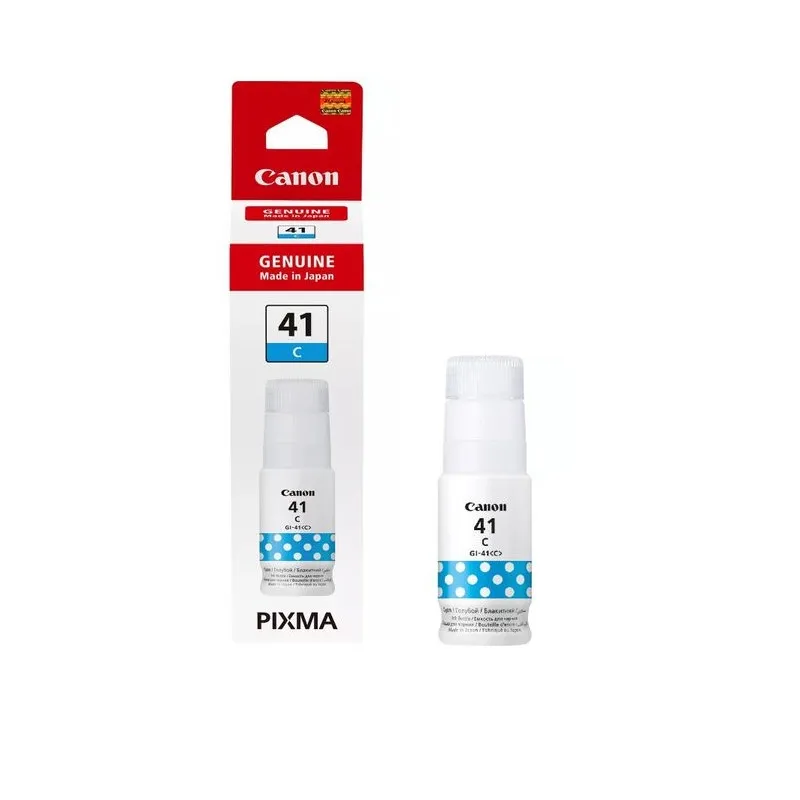
Canon GI-41C Cyan Ink Bottle 70ml
The Canon GI-41C Cyan Ink Bottle is an original 70ml dye-based ink refill developed for selected Canon PIXMA G-Series printers. It produces clear blue tones, balanced colour documents and vivid photo output while making refilling straightforward with its keyed, no-squeeze bottle design.
This cyan ink is compatible with the Canon PIXMA G1420, G2420, G2460, G3420 and G3460. It is a practical choice for homes, schools and offices that regularly print colour documents, charts, learning materials, photographs and presentations.
Original Canon Ink for Consistent Colour Printing
The Canon GI-41C Cyan Ink Bottle is manufactured by Canon for use with supported PIXMA MegaTank printers. Its dye-based formulation helps produce smooth colour transitions, bright graphics and natural-looking photographs.
Because it is an original Canon printer ink refill, it is designed to work correctly with the supported printer’s ink-delivery system and cyan ink tank. This makes it suitable for users who want dependable everyday colour printing without changing conventional ink cartridges frequently.
70ml Dye-Based Cyan Ink
Each bottle contains 70ml of cyan ink. Cyan combines with the printer’s other colour inks to reproduce blue, green and related shades in photographs, business graphics, school projects and marketing materials.
The transparent ink tanks fitted to compatible Canon PIXMA printers make it easier to monitor the remaining ink level and refill the cyan tank when necessary.
High-Yield Printing for Home and Office Use
Canon states that a complete set of GI-41 colour refill bottles can produce up to 7,700 colour pages under the manufacturer’s specified testing conditions. This figure applies to the complete colour ink set and should not be interpreted as the yield of the cyan bottle by itself.
Actual page yield varies according to image coverage, documents printed, print settings, maintenance cycles and operating conditions. Even so, the refillable tank system makes the Canon GI-41C Cyan Ink Bottle a convenient option for regular, higher-volume colour printing.
Keyed No-Squeeze Bottle Design
The bottle features a colour-specific key-type nozzle designed to fit the correct ink-tank inlet. This helps prevent the cyan ink from accidentally being poured into another colour tank.
Its no-squeeze filling system allows ink to flow when the bottle is correctly positioned. The design helps reduce spills, splashes and unnecessary handling during routine printer maintenance.
Compatible Canon PIXMA Printers
The Canon GI-41C Cyan Ink Bottle is compatible with the following printer models:
- Canon PIXMA G1420
- Canon PIXMA G2420
- Canon PIXMA G2460
- Canon PIXMA G3420
- Canon PIXMA G3460
Compatibility notice: Check the complete model number printed on your printer and confirm that its cyan tank specifies GI-41C before ordering. Similar-looking Canon ink bottles may use different formulations or keyed nozzles.
Canon GI-41C Cyan Ink Specifications
| Brand | Canon |
|---|---|
| Ink series | GI-41 |
| Product identifier | GI-41C |
| Manufacturer part number | 4543C001 |
| Product type | Original ink refill bottle |
| Ink colour | Cyan |
| Ink type | Dye-based |
| Ink capacity | 70ml |
| Colour page yield | Up to 7,700 pages from a complete set of GI-41 colour bottles |
| Bottle system | Key-type, no-squeeze, mess-reducing nozzle |
| Compatible printer family | Selected Canon PIXMA G-Series printers |
| Quantity | One cyan ink bottle |
How to Refill the Cyan Ink Tank
- Confirm that your printer model supports the Canon GI-41C ink bottle.
- Place the printer on a stable and level surface.
- Open the printer’s ink-tank cover and locate the cyan tank marked “C”.
- Remove the GI-41C bottle cap without squeezing the bottle.
- Match the keyed nozzle with the cyan tank inlet and insert it vertically.
- Allow the ink to flow automatically and remove the bottle when finished.
- Close the ink tank securely and follow any instructions displayed by the printer.
Do not place cyan ink in the black, magenta or yellow tank. Always follow the refilling instructions supplied with your Canon PIXMA printer.
Who Is This Canon Cyan Ink Suitable For?
- Families printing schoolwork and photographs
- Students producing projects and learning materials
- Home offices printing colour documents and reports
- Small businesses creating charts, notices and presentations
- Users who own a supported Canon PIXMA MegaTank printer
Canon GI-41C Cyan Ink in Nairobi
Customers looking for original Canon printer ink in Kenya can order the Canon GI-41C Cyan Ink Bottle from Shah Computers in Westlands, Nairobi. Visit us on the 1st Floor, Maharaja House, 01 Shivachi Road, opposite M.P. Shah Hospital, or call 0113 219 859 to confirm availability.
Explore more ink and toner cartridges for home, office and business printers.
Looking for more printer refills? Explore our full range of printer ink bottles for home, office and business printing.
Frequently Asked Questions
What is the Canon GI-41C Cyan Ink Bottle?
The Canon GI-41C is a 70ml original dye-based cyan ink refill for selected Canon PIXMA G-Series ink-tank printers.
Which printers use Canon GI-41C cyan ink?
It is compatible with the Canon PIXMA G1420, G2420, G2460, G3420 and G3460. Check your exact printer model before refilling.
Is the Canon GI-41C an original Canon ink?
Yes. GI-41C part number 4543C001 is an original Canon cyan ink bottle developed for supported Canon PIXMA printers.
How much ink is in the GI-41C bottle?
Each Canon GI-41C Cyan Ink Bottle contains 70ml of cyan ink.
Is Canon GI-41C dye-based or pigment ink?
The GI-41C contains dye-based cyan ink. It is formulated for colour documents, graphics and photo printing on compatible PIXMA printers.
How many pages does Canon GI-41C print?
Canon quotes up to 7,700 colour pages from a complete set of GI-41 colour bottles. This is not the yield of the cyan bottle alone, and actual output varies according to print coverage and settings.
Can GI-41C ink be placed in another colour tank?
No. It should only be used in the cyan tank marked “C”. Its keyed nozzle is designed to help match the bottle to the correct tank inlet.
Is the Canon GI-41C bottle completely spill-proof?
The bottle has a no-squeeze, mess-reducing design, but it should still be handled carefully, kept upright and inserted according to the printer instructions.
Can I use GI-41C in a Canon printer not listed here?
Only use the bottle when your printer manual or ink-tank label specifies GI-41C. Do not assume compatibility based only on the printer’s appearance or G-Series name.
Where can I find Canon GI-41C ink in Nairobi?
Contact Shah Computers on 0113 219 859 or visit our Westlands store on the 1st Floor, Maharaja House, 01 Shivachi Road, opposite M.P. Shah Hospital.
Reviews
There are no reviews yet.